
The Spark
Back at the end of April 2026, grok released a new Realtime voice model (grok voice think fast 1.0), and one aspect in particular caught my eye, the support for custom/remote MCP tool calling.
So I decided to put living, talking, emoting anime characters inside Odoo. The centerpiece being a half-lobster pirate quartermaster named Rex.
The tech stack
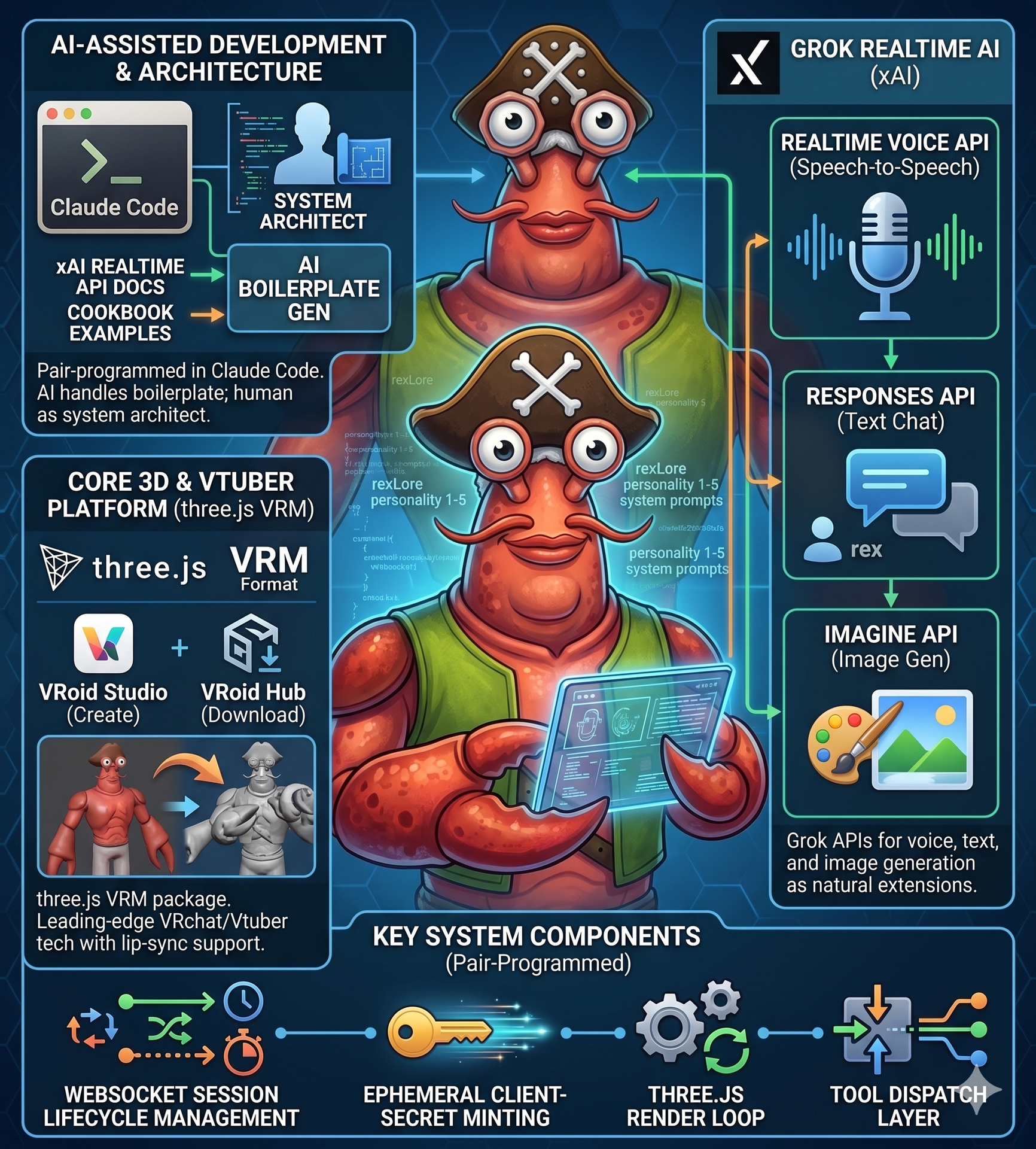
I didn't initially intend on going with the anime aesthetic of the bat, its certainly a risky strategy for a business app. I first did research on 3d model technologies that have support for voice lip sync technology, and well it turns out that VRchat/Vtuber tech is leading in this area and there's a three.js VRM package for it. Given the fact i know LLM models just love using threejs from my experience building games through odoo mcp studio, this was the obvious choice!
The beauty in this stack is there is already a vast ecosystem, its easy to both create your own avatars with vroid studio, or download pre-built VRM models from a vast library at hub.vroid .
As for grok, i ended up not only using the realtime voice API, but extended it to the responses API for standard text chat, and the imagine AP for image generation as natural extensions.
The Memory Problem Nobody Documented
There's is plenty written about how to connect to Grok Voice Realtime API. There is little written about how groks realtime voice already does/should handle memory over long running conversations.
Context management is hugely complex problem with AI in general, its the biggest problem in bridging the gap between an agent that knows your business inside out, and a standard chatbot with amnesia.
A session is one ongoing conversation — you pause it, resume it, keep adding to it indefinitely. RexClaw keeps a running token tally on it. Once that tally crosses a configurable threshold, a Grok summary model compresses the older turns into a tight summary while the most recent turns stay verbatim. The next turn picks up the compacted context. This allows key details of long running conversations to be kept over a long period of time automatically, and it happens live, a couple of seconds at compact time and then you can continue your conversation with token counter reset.
Then There's Long-Term Memory
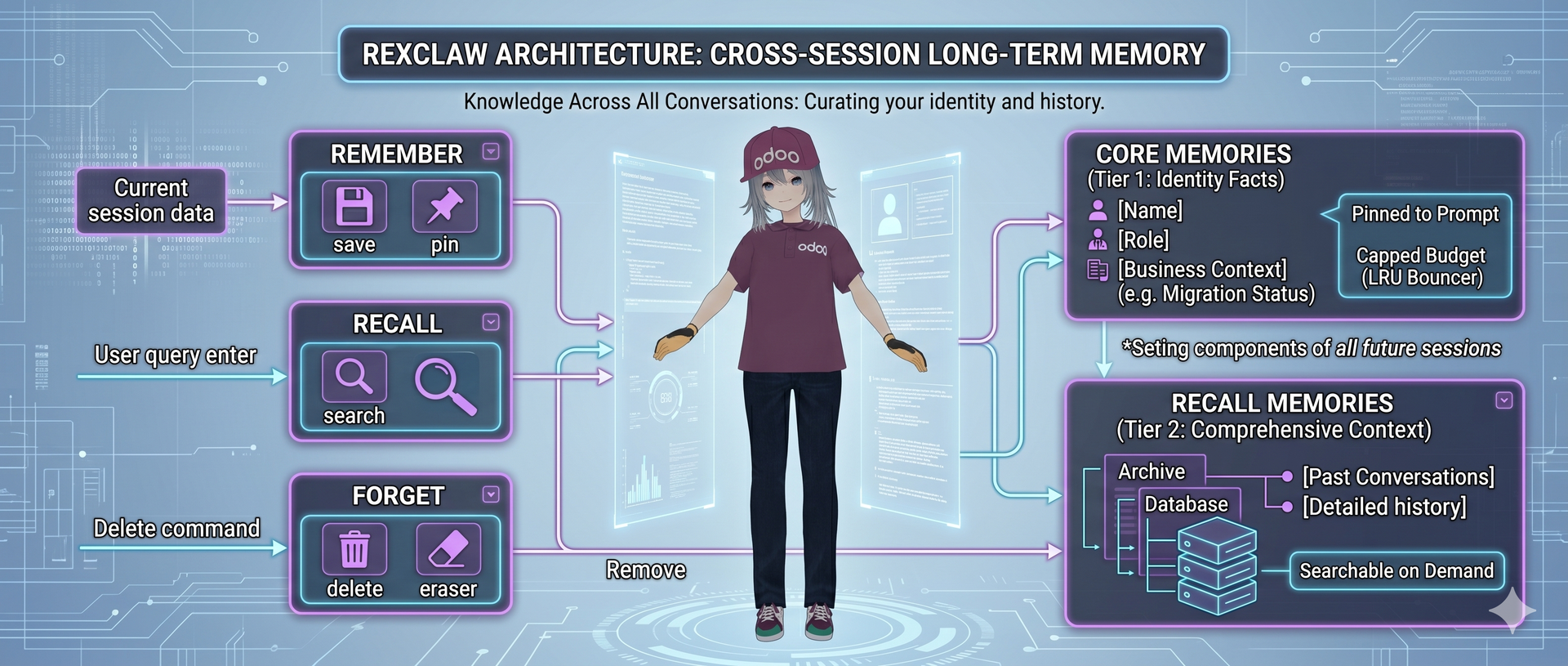
Within-session rollup keeps one conversation alive. But a companion should know you across every conversation you've ever had — your name, your business, that you're three weeks into a migration and grumpy about it.
This is a genuinely hard problem, Consistent long-term memory in a long-running chat is where most "AI companions" quietly fall apart — they either remember nothing, or they remember everything and drown in their own notes.
RexClaw gives every agent three tools: remember, recall, and forget, backed by a two-tier store:
- Core memories are the identity-level facts — name, role, business, long-standing preferences. These get pinned into every session's system prompt, capped to a configurable budget per agent. When the core pool fills up, the agent gets nudged to
surface and retire the oldest unaccessed memory, LRU-style. It's a working memory with a bouncer.
- Recall memories are everything else — searchable on demand. When you say "remember when I told you about…", the agent can fire recall, which runs a hybrid stemmed full-text + trigram similarity search. The trigram layer is interesting: it catches typos and spelling variants the stemmer alone misses — color ↔ colour, fat-fingered product codes, the works.
Teaching it to navigate odoo
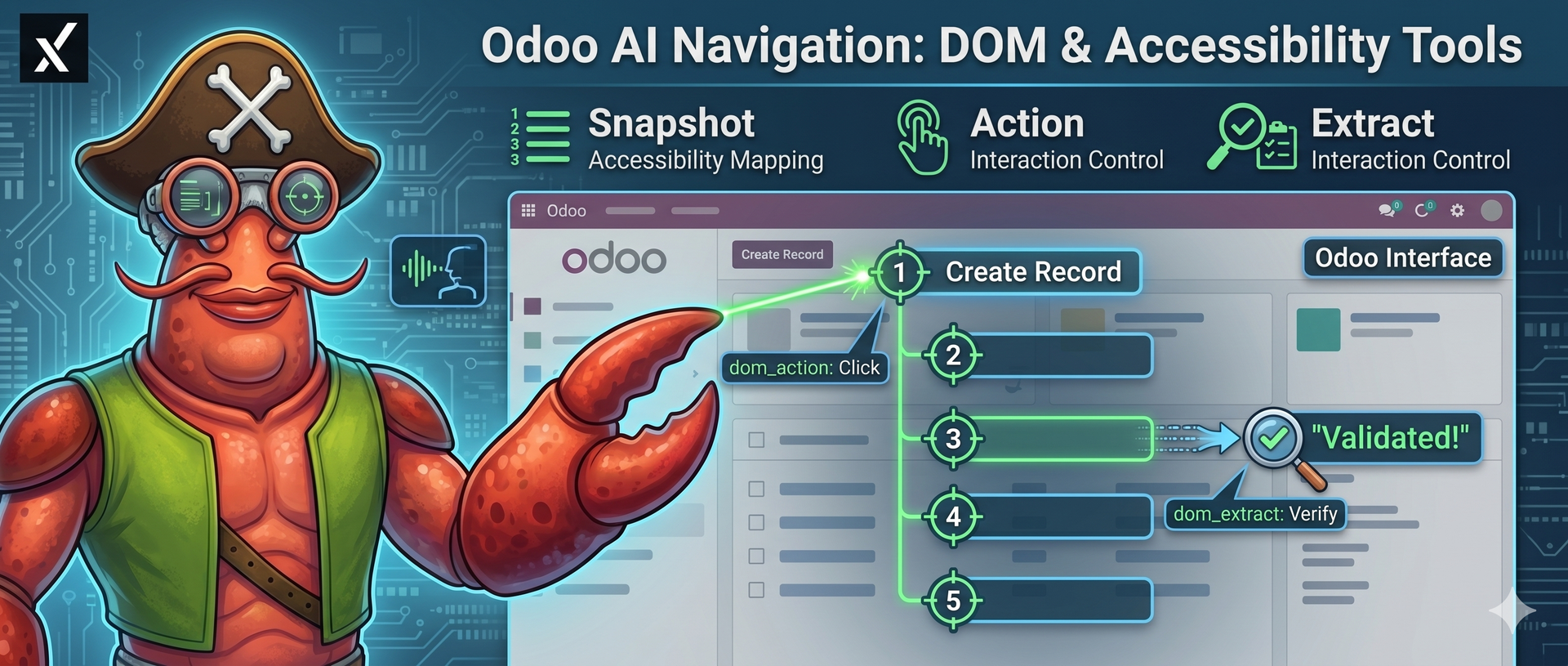 Curated navigation tools (open_record, find_action, dispatch_action) cover most of "take me to that screen with x filtered" But sometimes the agent needs to reach a button or a free-form field that no neat API exposes.
So it also gets DOM tools. dom_snapshot walks the page's accessibility tree and returns the interactive elements as a clean numbered list — buttons, inputs, links, by ref. Then dom_action clicks, fills, selects, presses, hovers, or focuses any of them (it even handles rich-text editors / many2one field format), and dom_extract reads back text or attributes so the agent can verify the action actually landed.
It's the same accessibility-tree approach that good browser-automation agents use — and parsing the tree instead of raw DOM means the agent "sees" the page roughly the way a screen reader does. Which is a nice accidental theme for a voice-first, accessibility-friendly module.
Meet the Crew
The module ships with five fully-written companions, each with a distinct Grok voice, a backstory, speech quirks, and a default outfit. Not "you are a helpful assistant" — actual characters, written out in a structured RexLore system prompt (identity, backstory, personality, speech style, values, boundaries, tool guidance).
- Rex — the half-lobster quartermaster. Bright red, pincer claws, olive pirate vest, tricorn hat with the skull-and-crossbones. Mission-control calm, dry pirate humour, occasional shanty when the books balance. "Captain — manifest's clean. Three crates short on the May invoice. Want me to pull the source?"
- Eve — caffeinated junior researcher, PhD dropout, reacts before she replies ("wait — really?").
- Ara — warm, patient mentor. Older-sister energy, drinks tea, climbs cliffs on weekends and would never mention it.
- Sal — half-frog systems thinker who sees every workflow as a balance problem with second-order effects.
- Leo — a dignified stage manager in a gothic tailcoat who treats every record like a lighting cue. "Standby… go."
Every one of them is editable. Clone, fork, rewrite the prompt, swap the voice, share with whichever users or groups you like. The crew is a starting point, not a fixed cast.
The Fun Part: Avatar Emotions and Gestures
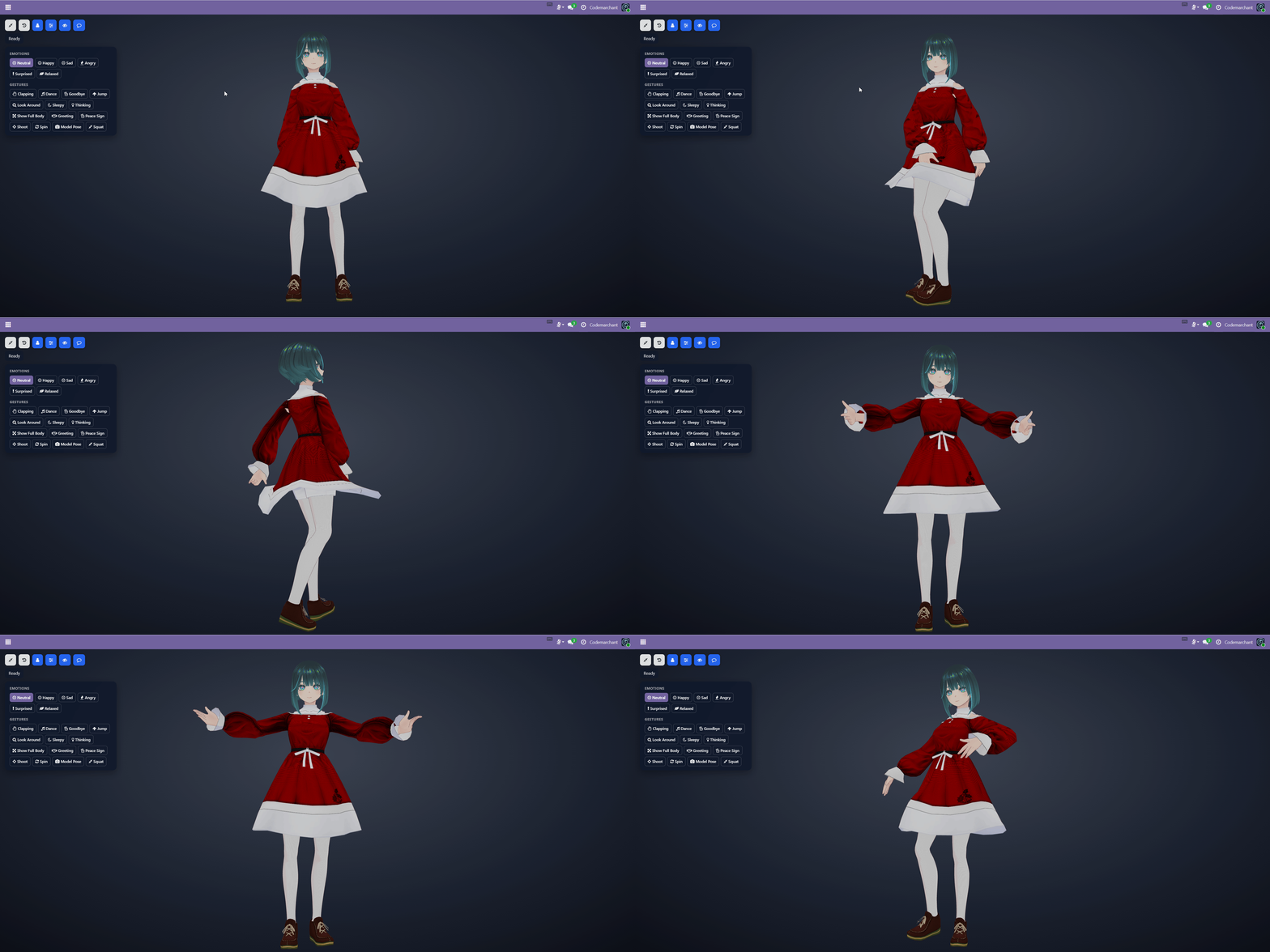
The avatars are standard .vrm files rendered. The lip-sync is audio-driven: a formant-analysis service maps the live audio stream onto VRM mouth shapes (aa/ih/ou/ee/oh) frame by frame, browser-side, zero perceptible lag. No pre-rendering, no scripted mouth flaps. The mouth moves with the actual sound.
But the magic is emotion and gesture, triggered by the conversation itself. The agent calls set_emotion to blend a facial expression — happy, sad, surprised, relaxed, angry, neutral — in real time, because of what's being said. Tell Eve good news
and she lights up. Give her a number that doesn't reconcile and she pulls a face before she's even finished the sentence. It's not on a timer. It's contextual.
And then there are gestures, served as .vrma motion clips: thinking, clapping, jump, peace_sign, spin, dance, look_around, sleepy, goodbye, model_pose, and more. The agent picks the right one for the beat — a little spin to celebrate a created record — or you trigger them manually, just ask "do a spin". You can upload your own .vrma clips per avatar and they extend the agent's gesture vocabulary automatically.
Watching an agent create a contact, then spin to celebrate, mid-sentence, unprompted — that's the moment the "it's a gimmick" objection dies.
Animation credit where it's due: the sample VRMA motions come from pixiv's VRoid Project.
I Dressed My Avatar in Odoo Merch
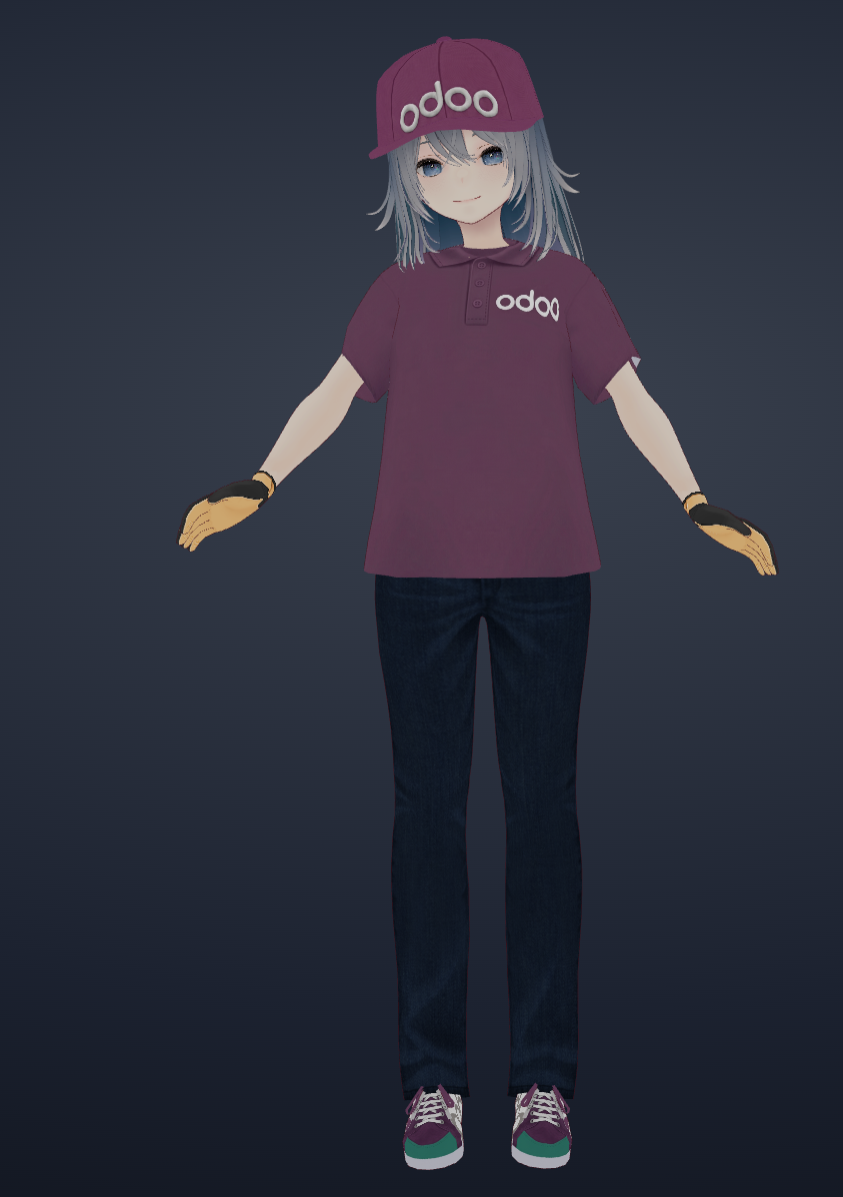
Here's where I admit how much of a hole I fell down.
I spent real time in VRoid Studio — Pixiv's free character-design app — modelling several of the included avatars with outfits (ara, eve, sal). Then, I used Gemini to generate fabric textures, layered them into VRoid as layers, and built a full Odoo-branded outfit: purple shirt with the Odoo logo, a matching cap, and branded sneakers. An "Odoo Experience fit" for the conference floor.
Outfit swapping is a real feature — why exactly is this useful for an ERP you might ask? Well job satisfaction is an underrated metric, if its Christmas, dress your companions with winter fits to match the occasion, if its odoo experience time, select the odoo experience fit to celebrate, watch every employees productivity skyrocket 🚀
You can either direct the companion to change outfits, or change them yourself manually in the full screen view, each outfit comes with a description so the agent knows what its wearing.
Theirs even a tool to change the background, set the stage per avatar, and combined with the Grok Imagine tools, the agent can generate a new backdrop on the fly and switch to it.
The Ashtray (real usability)
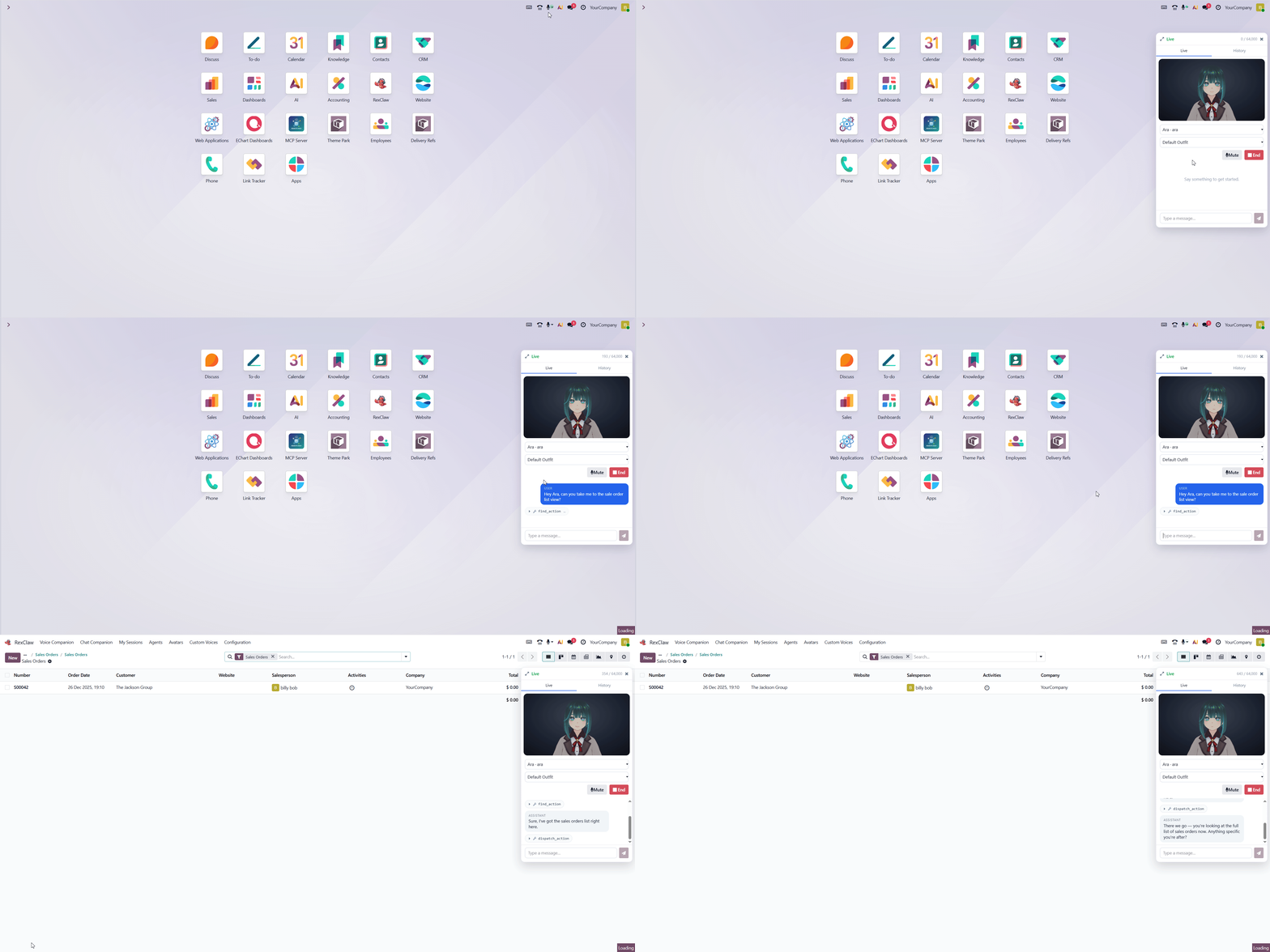
Most chat widgets die the moment you collapse them. RexClaw's pop-out — the ashtray, because it pops out of the systray — does not.
Once a voice session is live, the mic stays live, even after you click away and close the panel. Ask Rex to confirm an order while you scroll the kanban. Get a number from Eve while you're typing an email. On mobile it's even better: one tap to call,
pocket the phone, keep talking. The avatar's right there when you reopen the tray. It's a small thing that completely changes how the module feels — the companion is present, not a modal you summon and dismiss.
Agent Heartbeats (NEW)
That's the last step from a companion you summon to one that's actually on the crew.
The Rest of the Kit (The Speed Round)
A grab-bag of things that didn't get their own heading but earn a mention:
- Voice mode and text mode, same persona, same toolset. One text prompt can read an attached image, query Odoo for a product count, and generate a dragon via Grok Imagine — in a single turn.
- Multi-lingual out of the box. Every Grok voice speaks English, Spanish, French, German, Japanese, Mandarin and more, with the right accent. Switch language mid-sentence; the agent follows.
- Custom voices — paste a voice ID from the Grok Console library, or upload an audio sample and let the module clone it.
- Per-agent tool toggles. Read tools default on, writes default off. Every Odoo tool call runs as the connected user, bounded by their ACLs and record rules — the agent can't see or touch anything you couldn't.
- Daily caps per user — a voice token ceiling and a text/imagine USD ceiling, enforced server-side. No surprise xAI invoices.
- Remote MCP connections. Attach any streaming HTTP / SSE MCP server per agent, Bearer auth, per-connection tool allowlists.
-
That last one is the bridge back to where this all started. It Pairs With Odoo MCP Studio (Of Course It Does)
RexClaw ships with the essentials. For everything heavier, you plug in Odoo MCP Studio (https://apps.odoo.com/apps/modules/19.0/odoo_remote_mcp) as a remote MCP connection and suddenly your half-lobster can do full ORM access with model/field restrictions, the web app builder, the module builder, ECharts dashboards — all by voice
The Limitations
- It needs an xAI key with Grok Voice Realtime access. No key, no voice. That's the one hard dependency.
- Realtime voice costs realtime money. Hence the caps, the summarisation thresholds, the auto-closing idle connections (xAI drops idle sessions after 15 minutes). You will want to tune the knobs.
- Custom voice cloning is subject to xAI's regional availability. Not my rule; theirs.
- It's a companion, It's bounded by what the connected user can already do. If you can't see payroll, neither can Rex. That's a feature.
What's in the Module Now
- xAI Grok Voice Realtime integration — sub-second voice, multi-lingual, VAD turn-taking
- Anime VRM 3D avatars — three.js + @pixiv/three-vrm, audio-driven lip-sync, idle blink/breath/lookAt
- Context-driven emotions & gestures — set_emotion + .vrma clips the agent fires by conversation context
- Outfits, backgrounds & custom gestures — swap live, generate backdrops via Grok Imagine
- Two-layer memory — rolling within-session compaction + durable cross-session remember/recall/forget with trigram search
- 22 agent tools — native Odoo read/write, navigation, DOM automation, web/X search, code execution, Grok Imagine
- Five written personalities + full agent customisation (persona, voice, avatar, sharing, caps, reasoning effort)
- The Ashtray — keep talking with the panel collapsed, desktop or mobile
- Voice & text modes, custom voices, per-user daily caps, configurable retention
- Remote MCP connections — bring your own toolset; pairs with Odoo MCP Studio
-agent heartbeat system for autonomous agent activities
Check It Out
-youtube demo:
- https://apps.odoo.com/apps/modules/19.0/odoo_rexclaw_companions — get the module
- https://apps.odoo.com/apps/modules/19.0/odoo_remote_mcp — Odoo MCP Studio, the perfect pairing
- VRoid Studio (https://vroid.com/en/studio) — design your own VRM characters (free)
- VRoid Hub (https://hub.vroid.com) — community VRM library