
The Spark
I started this journey in late December 2025 with a basic idea: I want to implement a remote Odoo MCP, all self-contained through an Odoo module that's easy to use for all types of users.
Remote MCP was new at the time and I saw a niche in the market. There were already many local open source Odoo MCPs out there, I'd tested and used some myself as part of my work. For the basic operations they supported, they worked okay, but there were bugs and issues with all the options I tried. And the setup required local installations - a non-tech person's nightmare. Yuck.
Remote MCP solutions? Nowhere to be found.
Off I went to cook up a plan.
Phase 1: The Architecture Problem
First up, I had to decide on the technical architecture. What exactly is remote MCP? How does the protocol work? Can I use a wrapper?
I researched and immediately found FastMCP - a Python library designed for the MCP protocol. Sounds perfect! An easy way to implement the MCP protocol, nice docs, well supported.
One problem: you have to run it through a different port.
Oh no.
My dreams of using FastMCP were shattered. I can't run this through a separate port - it needs to all run through the Odoo port/application to remain a self contained module, and support servers like Odoo.sh that don't allow running applications on separate ports.
I made the decision to do it the hard way: implement the full MCP spec myself.
https://modelcontextprotocol.io/specification/2025-11-25
I researched and immediately found FastMCP - a Python library designed for the MCP protocol. Sounds perfect! An easy way to implement the MCP protocol, nice docs, well supported.
One problem: you have to run it through a different port.
Oh no.
My dreams of using FastMCP were shattered. I can't run this through a separate port - it needs to all run through the Odoo port/application to remain a self contained module, and support servers like Odoo.sh that don't allow running applications on separate ports.
I made the decision to do it the hard way: implement the full MCP spec myself.
https://modelcontextprotocol.io/specification/2025-11-25
Phase 2: OAuth & Authentication
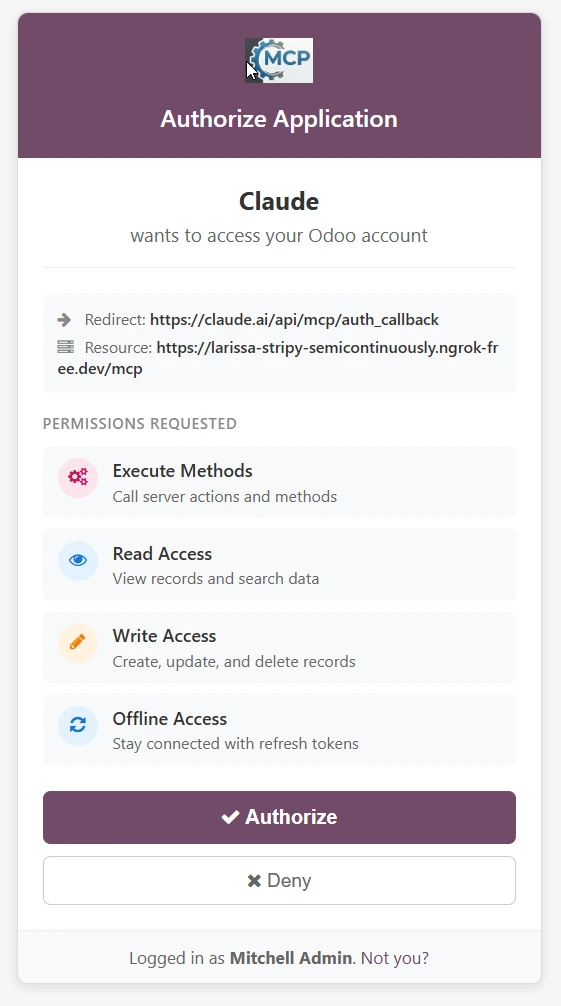
With my trusty buddy Claude Code, we got to work. I fed it the MCP protocol OAuth docs, came up with a high level plan. Fed it the same specs again, re-reviewed the plan, tweaked to make it just right.
AI got me 80% there. The remaining 20%? Debugging, refactoring, and learning concepts I'd never touched before:
- OAuth 2.1 with PKCE security
- Dynamic client registration
- Access token rotation and refresh flows
- Scope-based permissions
The foundation took a week of grinding over the christmas period, the result was worth it: Odoo acting as a remote MCP OAuth provider that integrates seamlessly with its user login and permission system - following the MCP specs security requirements.
Phase 3: Core MCP Tools
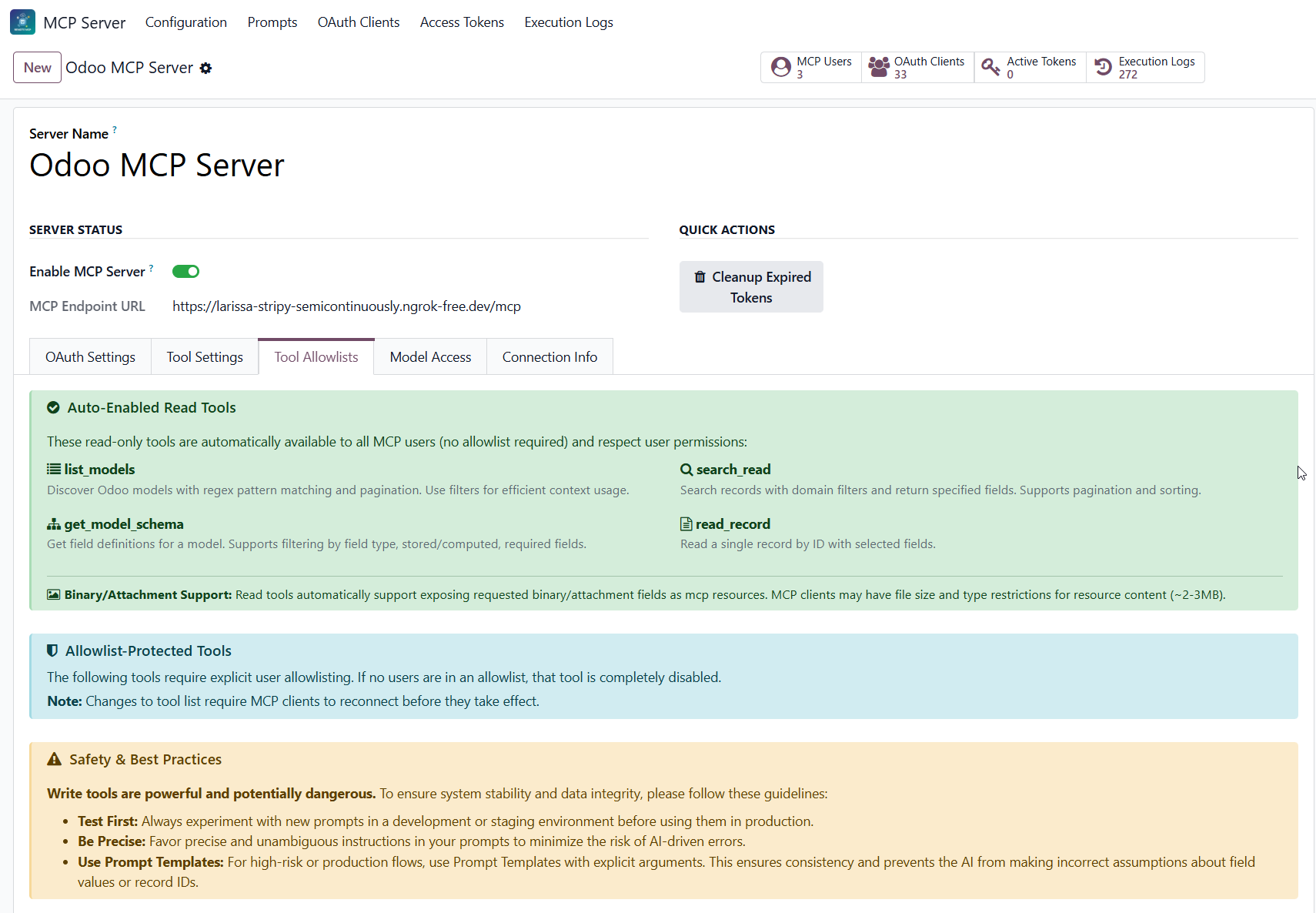
Next: onto the flagship feature of MCP - tools.
I started with basic CRUD tools, and then some extras to list model/field schemas with multiple filtering options, so the AI models can be context-efficient in their tool calls.
Each tool needed careful work: JSON sanitization, execution audit logs, and granular access control so enterprise clients could restrict access per user, model and field.
The Security Grind
Access control is boring but critical. I implemented:
- Model and field-level blocklists
- User allowlists for write/execute operations
- Complete audit logging of every tool execution
After a long grind focusing on security and MCP tooling architecture, I needed a break. Built myself a nice little chess app in Odoo. Sometimes you need to ship something fun.
Phase 4: Prompt Templates & Resources
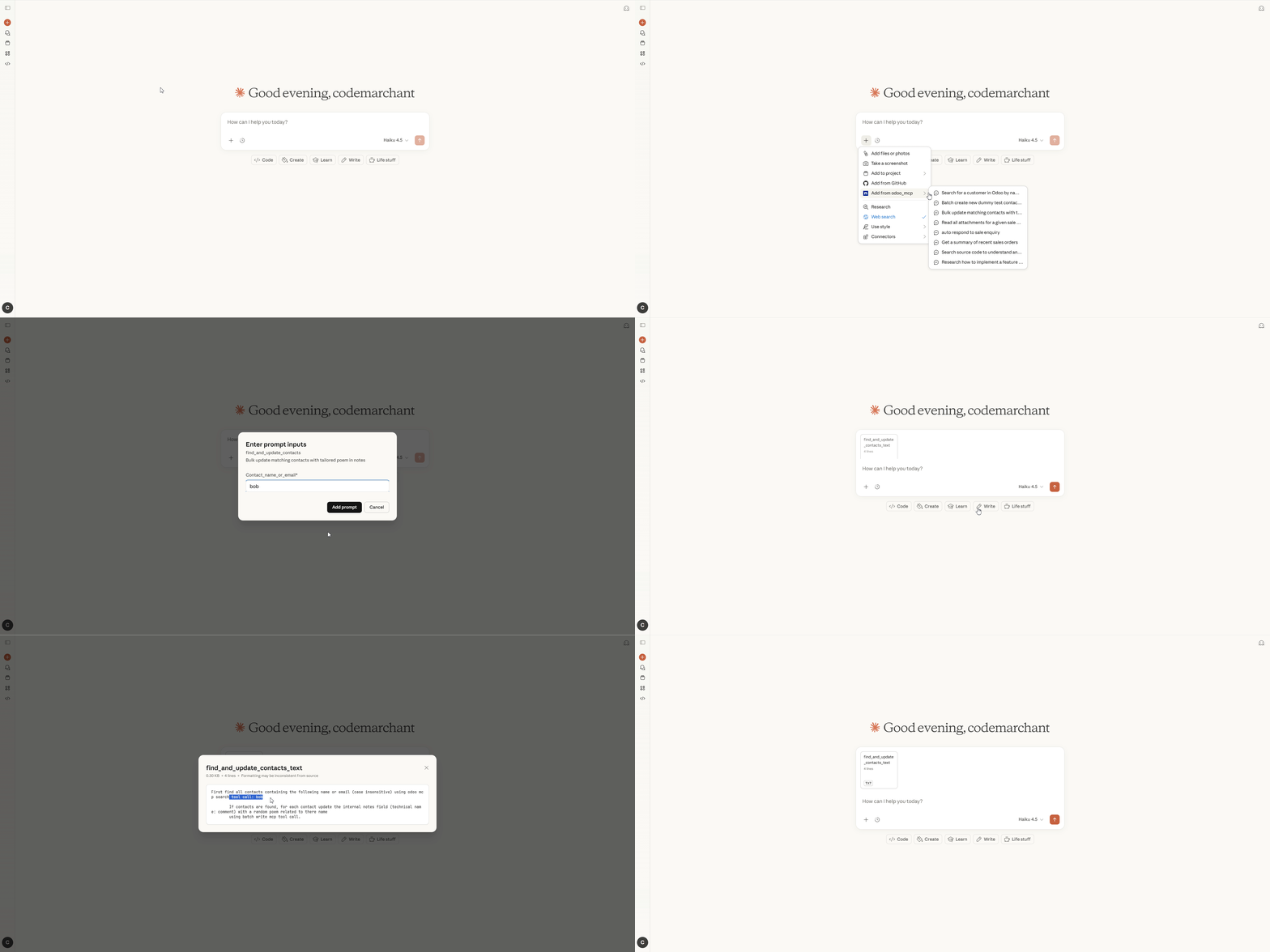
Back at it, I tackled more MCP features:
Prompt templates - reusable prompts with embedded arguments, configurable entirely through Odoo's UI. Perfect for standardizing common AI interactions.
Then onto resource embeddings. How can I parse attachment data? Got into the weeds of decoding Odoo binary fields and attachments. I found Claude's MCP resource support to be limited for a lot of file types, and one issue with their image file size limits stumped me for hours.
In the end, I set up support for resource embeddings and templates. AI can now fetch all field data from Odoo models.
At this point I was happy with the MCP spec implementation. It's got all the fundamentals: tools, prompt templates, and resource embeddings. There's some bells and whistles I could implement, but the core is all there.
What next?
In the end, I set up support for resource embeddings and templates. AI can now fetch all field data from Odoo models.
At this point I was happy with the MCP spec implementation. It's got all the fundamentals: tools, prompt templates, and resource embeddings. There's some bells and whistles I could implement, but the core is all there.
What next?
Phase 5: The execute_orm Power Move

I started getting ideas to go beyond. An article from Anthropic inspired me: https://www.anthropic.com/engineering/code-execution-with-mcp.
It describes a problem I was noticing—consecutive tool calls can be context inefficient, and if the AI agent could just simply write and execute code, it could do things more efficiently. Sounds perfect!
The spirit of that article was more around executing tool calls as code. I took it a step further: what about if we just execute arbitrary python code? We're into power user territory now. Security at risk, but you have to take risks to get rewards.
It describes a problem I was noticing—consecutive tool calls can be context inefficient, and if the AI agent could just simply write and execute code, it could do things more efficiently. Sounds perfect!
The spirit of that article was more around executing tool calls as code. I took it a step further: what about if we just execute arbitrary python code? We're into power user territory now. Security at risk, but you have to take risks to get rewards.
I discovered Odoo's safe_eval - a sandboxed python execution environment used for automated actions. It allows arbitrary code but blocks dangerous imports.
The execute_orm tool was born: AI writes Python code, it runs through safe_eval, results come back as JSON. Suddenly the AI could do complex aggregations, multi step logic, and batch operations in a single call.
Side effect: AI loves to ignore instructions. No matter how explicit I made "NO PYTHON IMPORTS ALLOWED" in the tool description, sometimes it has to fail and learn the hard way through the returned error response before it gets it right. I found this pattern more problematic with inferior AI models
Phase 6: Code Search for Everyone

Then one morning, another genius idea popped into my head.
I've used Claude Code for Odoo development for over a year. Its ability to search and read codebases is invaluable. It could be useful for non-tech folk to be able to ask questions, generate codebase documentation, and not just rely on Odoo's notoriously poor documentation - but rather the code itself. I've even done some of these use cases with local MCP before.
But Claude Code is a developer tool. How can non-tech people figure out the steps to open a terminal and install that? Same problem with Claude Desktop - you have to open a JSON config file. It's way too many steps, their brains might implode.
I wanted to bridge the gap. Provide code search/read tools directly accessible through friendly websites like claude.ai where you just need to login.
But Claude Code is a developer tool. How can non-tech people figure out the steps to open a terminal and install that? Same problem with Claude Desktop - you have to open a JSON config file. It's way too many steps, their brains might implode.
I wanted to bridge the gap. Provide code search/read tools directly accessible through friendly websites like claude.ai where you just need to login.
Inspired by how Claude Code works, I cooked up some code search/read tools. They search all the addon paths on your server and can collect/read files through ripgrep regex searching and pagination.
Perfect. Now MCP data access is solved - all code and data accessible efficiently through the combination of tools I built.
I released the app at this point. Moved onto other projects. Felt it was complete.
Phase 7: The Dashboard Awakening
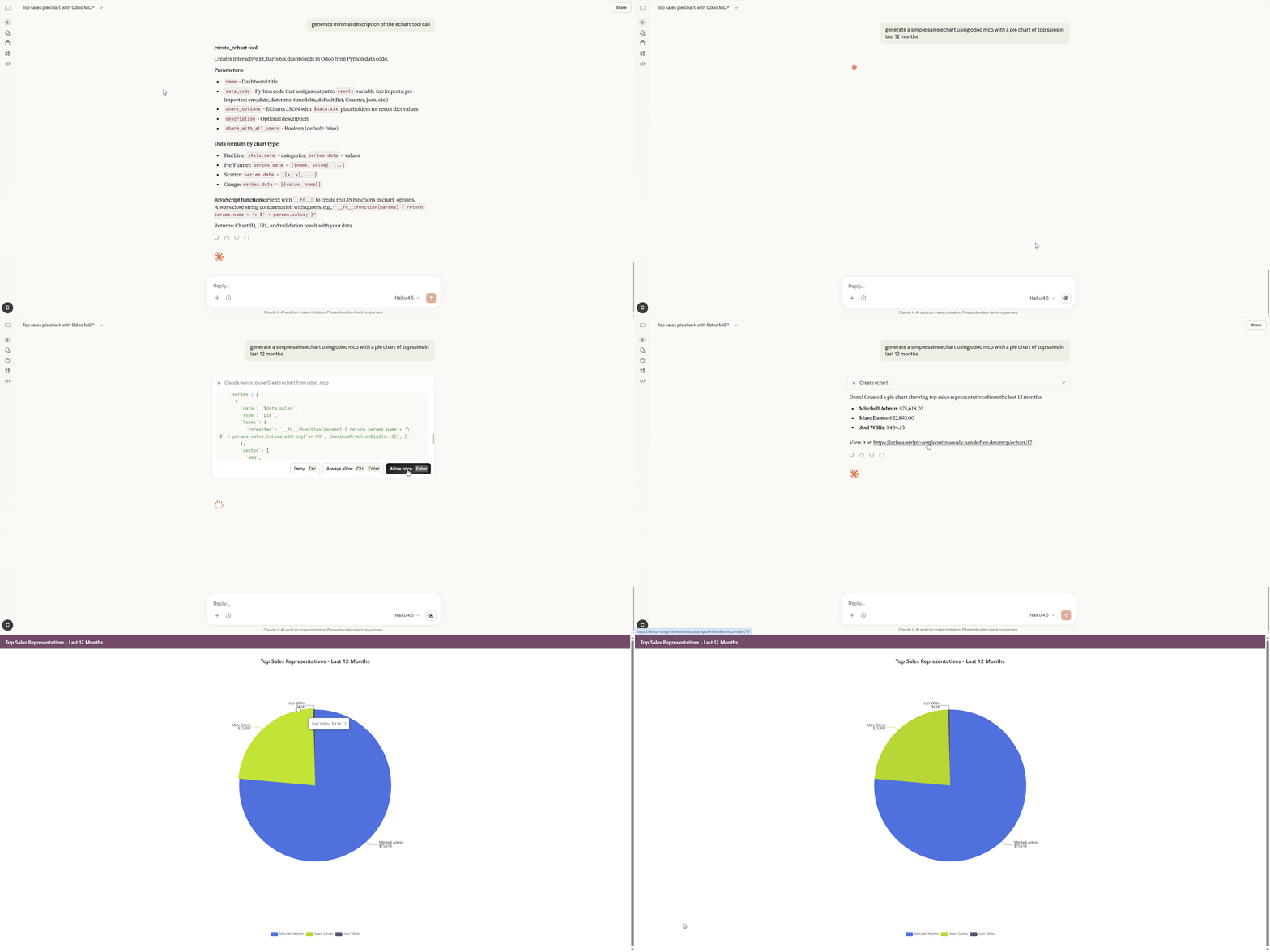
After some bug fixes and helping my first customer with additional multi-database support (shout out to my Spanish comrade), I got ambitious once again.
More ideas came into my head. While I was thinking of other Odoo modules to build, I had the thought: there's a lot of these AI dashboard creator modules out there, but none of them are building those dashboards through my cracked MCP tools.
Let's do that!
Researched some dashboard libraries. There were a few top candidates: Apache ECharts and Chart.js. In the end I decided on Apache ECharts.
Let's do that!
Researched some dashboard libraries. There were a few top candidates: Apache ECharts and Chart.js. In the end I decided on Apache ECharts.
I got to work. The idea was to provide a blank canvas for AI to build ECharts. How can it do this? Well, we already have the concept of execute_orm - that can be used to get all the Odoo data we need. If we have the data, we just need a system to feed it to a canvas that can build the chart.
It worked like a treat. Python gets the data, and that data can be used in EChart JSON options/JavaScript to render beautiful dynamic dashboards.
Now we're really starting to get somewhere. AI building any dashboard you want. I had it build some 3D sales globes - because 3D data is cooler than 2D data. Check out what apache echarts can support with examples here (and codemarchant.com home page for a world globe embedded as an iframe) here. https://echarts.apache.org/examples/en/index.html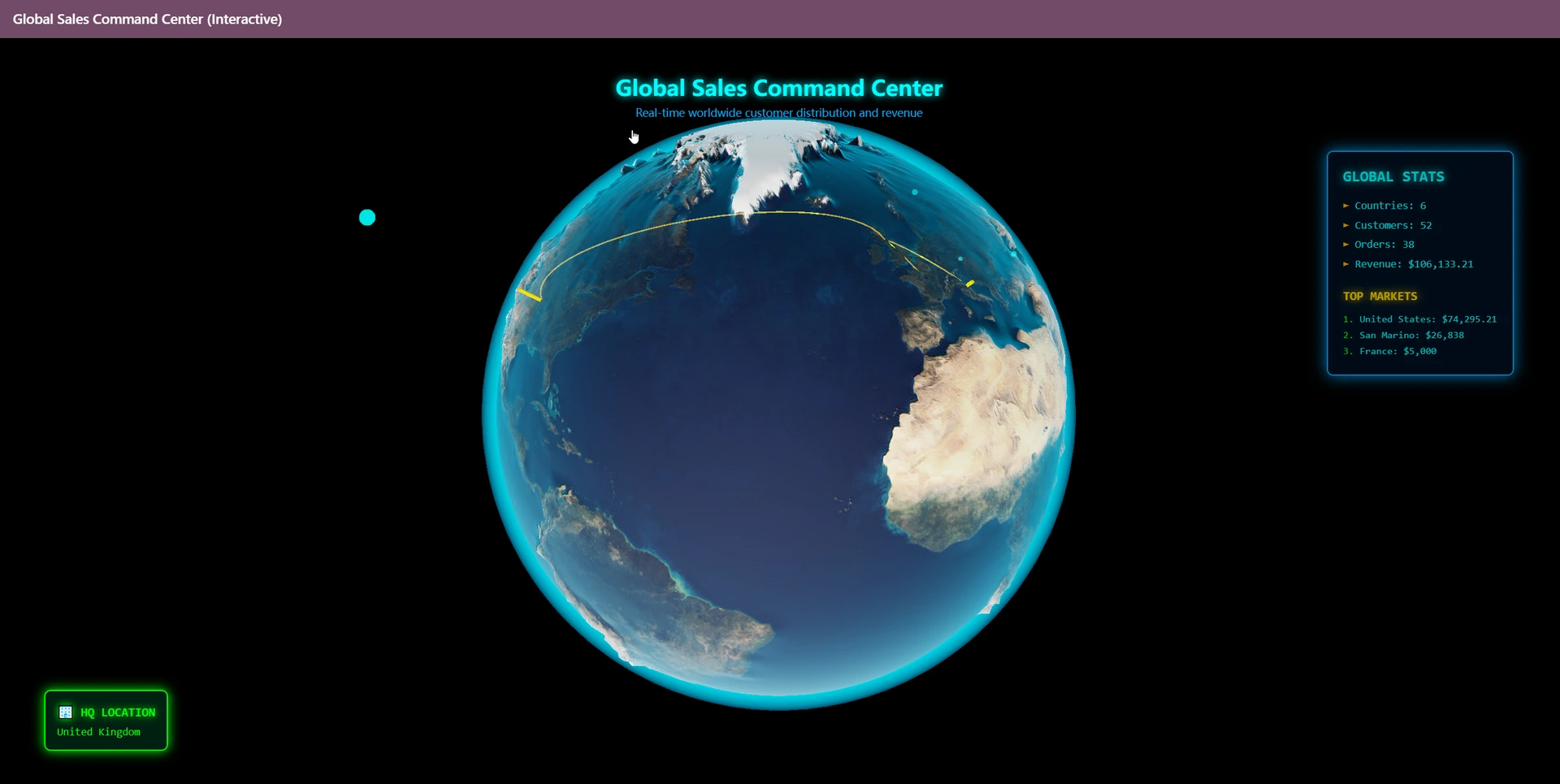
Now we're really starting to get somewhere. AI building any dashboard you want. I had it build some 3D sales globes - because 3D data is cooler than 2D data. Check out what apache echarts can support with examples here (and codemarchant.com home page for a world globe embedded as an iframe) here. https://echarts.apache.org/examples/en/index.html
Phase 8: React Apps, No Build Step, Pure Vibes
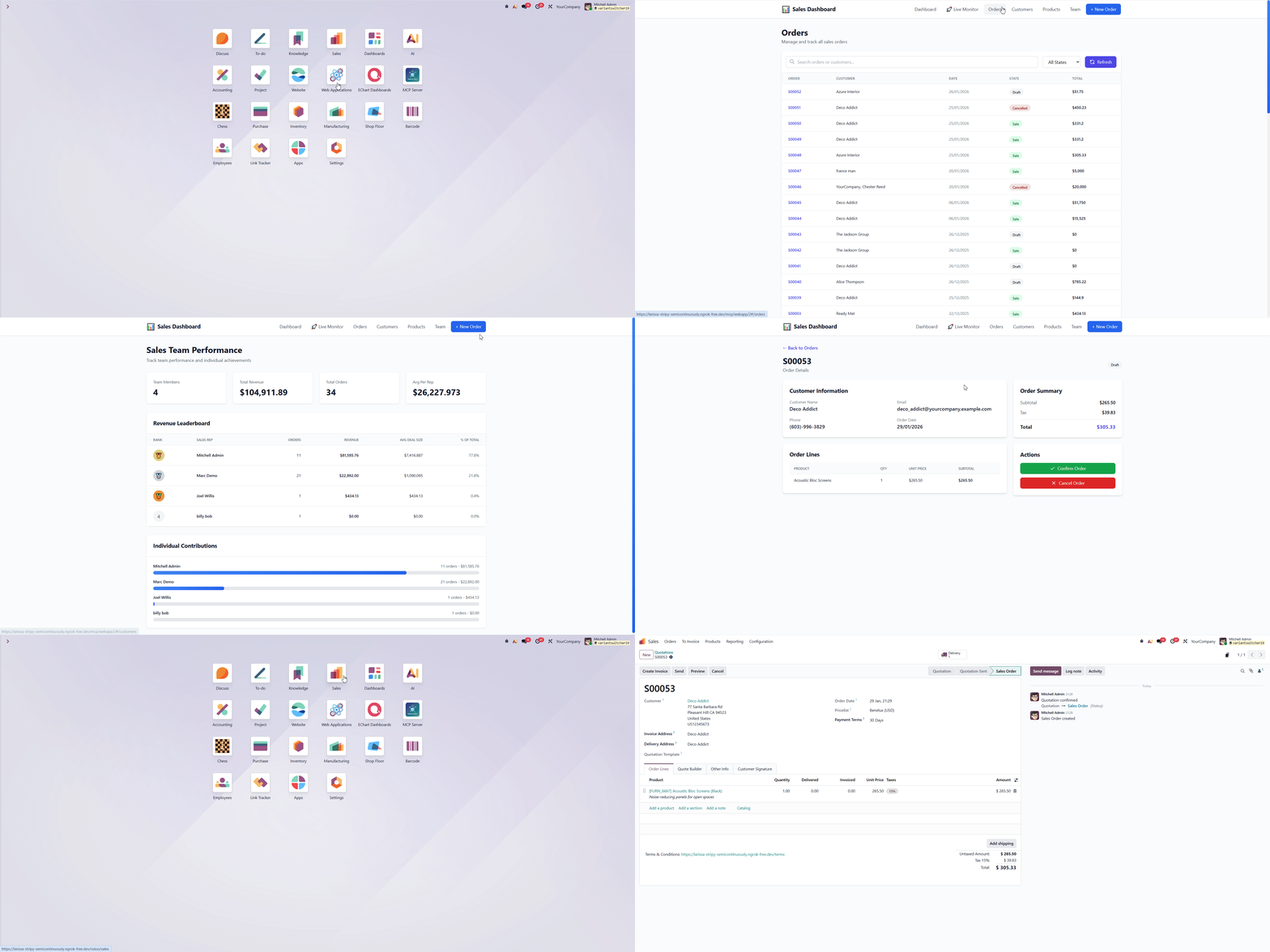
The dashboard feature was all well and good, but I wanted to go even further beyond, plus ultra. (i was finishing up the last season of my hero academia at the time)
So I started pondering. Read a Reddit thread about a site called HelloLeo that allows you to build React applications that can connect with Odoo. Problem? It's third party. Lame. I'm an Odoo ERP locked ironman - I can't leave Odoo.
I pondered if my MCP tools could to do something similar. I schemed with my buddy Claude: how can I serve applications through my MCP module? I don't want any build steps. Explored modern options like Bun.js, Svelte - all need npm install. No good.
The tech stack eventually decided on was React 19 + Tailwind CSS + Babel, all served through CDNs requiring no build step. Sounds good to me.
The manage_webapp tool was a lot more tricky than the EChart tool. The infrastructure was similar - we execute Python through safe_eval to get the data, then pass it through a React canvas setup. Only the React wrapping architecture was a lot more sophisticated.
I added support for:
- Dynamic API endpoints
- Loading other CDN scripts
- Shared React components between pages with global CSS
- React Router for multiple pages
- Persistent user storage
- Export template/backup csv buttons to support the vibe coding flow
- Dynamic API endpoints
- Loading other CDN scripts
- Shared React components between pages with global CSS
- React Router for multiple pages
- Persistent user storage
- Export template/backup csv buttons to support the vibe coding flow
How about improved error handling? If a non-tech person has to press F12 to see all errors in the console, that's a problem. We wrap everything in a React error boundary component to make it as user-friendly as possible.
Given that my only experience with React was building a todo app 5 years ago, I think I did a pretty good job. It's similar to Odoo QWeb in a lot of ways - I have the system design fundamentals. Claude helped with that syntax sugar.
Given that my only experience with React was building a todo app 5 years ago, I think I did a pretty good job. It's similar to Odoo QWeb in a lot of ways - I have the system design fundamentals. Claude helped with that syntax sugar.
Where We Are Now
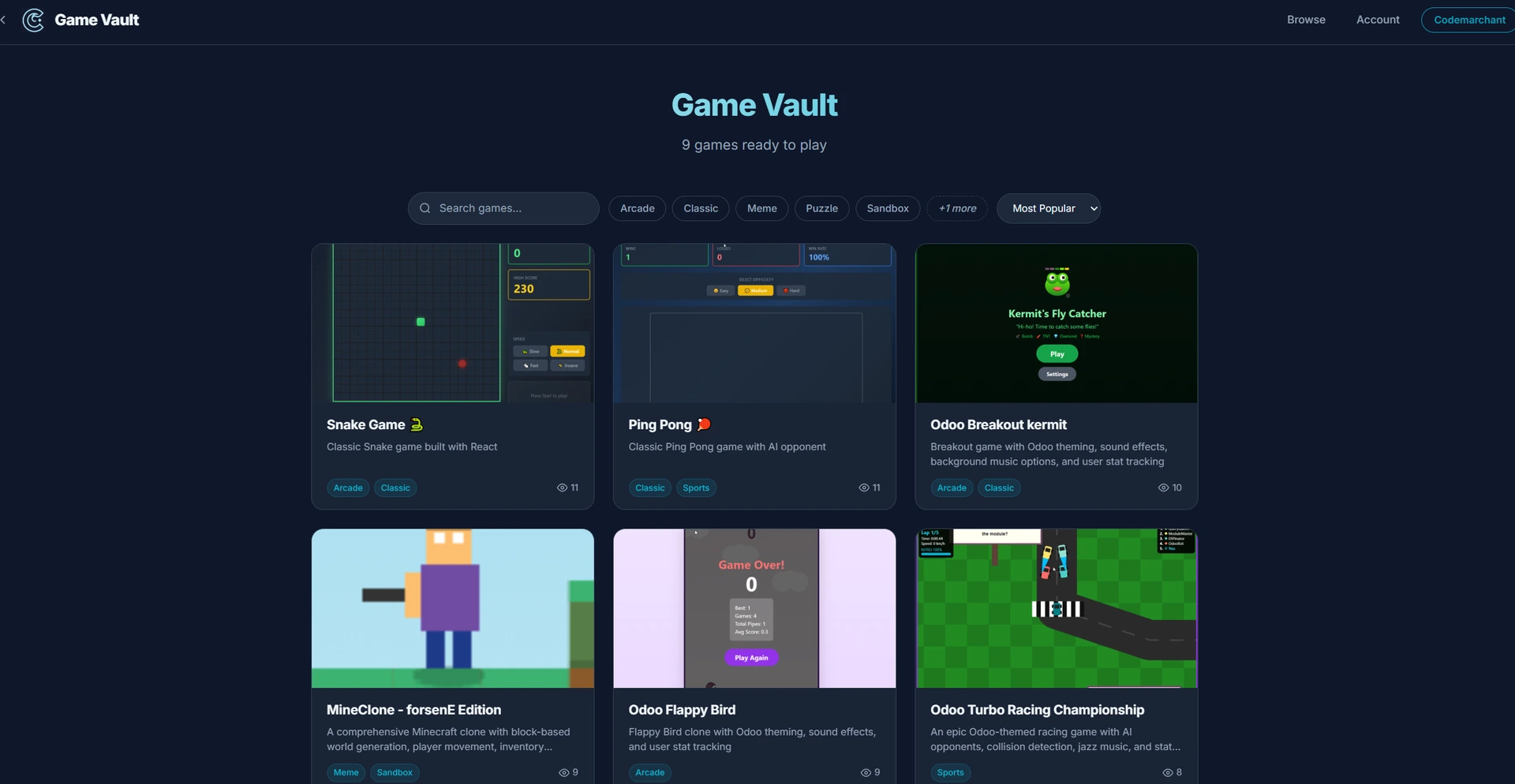
I've been using the manage_webapp tool to satisfy my vibecoding addiction. I can now cook up mini meme games with Claude using the tool, and publish them to my Game Vault - also built with the tool.
What's in the module:
- 13 MCP tools (CRUD, code execution, code search)
- Full OAuth 2.1 with PKCE security
- ECharts dashboard builder (including 3D globes, gauges, word clouds)
- React web app builder (no build step required)
- Prompt templates with argument substitution
- Complete audit logging
- Granular access control per user, model, and field
What's Next?
A little birdy tells me it's possible to import modules through zip files with no build step. I love no build steps.
Job openings to fix vibe-coded zip modules through a manage_module tool soon? Stay tuned!
Check It Out:
- https://codemarchant.com/mcp/webapp/game-vault - All my MCP built games
- https://apps.odoo.com/apps/modules/19.0/odoo_remote_mcp - Get the module
- https://github.com/Codemarchant/odoo_mcp_app_library Importable demo apps
Enjoy!
Update: The manage_module tool is live. link to new blog post
Job openings to fix vibe-coded zip modules through a manage_module tool soon? Stay tuned!
Check It Out:
- https://codemarchant.com/mcp/webapp/game-vault - All my MCP built games
- https://apps.odoo.com/apps/modules/19.0/odoo_remote_mcp - Get the module
- https://github.com/Codemarchant/odoo_mcp_app_library Importable demo apps
Enjoy!
Update: The manage_module tool is live. link to new blog post