
The Hidden Feature
Odoo has a feature that's been hiding in plain sight: the ability to import data modules through zip files. No addons path. No server restart. No build step. Just zip and install.
It's buried in the developer tutorials like a treasure chest nobody told you about. https://www.odoo.com/documentation/19.0/developer/tutorials/importable_modules.html
I've been an Odoo dev for 8 years. Eight years! And this feature managed to elude me the entire time. Turns out it's been around since v8 - that's over 12 years ago. I felt like I'd discovered a secret room in a house I've lived in my whole life.
The timing couldn't have been more perfect.
Connecting the Dots
I had just finished building the create_echart and manage_webapp tools (see previous blog post). Both follow the same philosophy: give AI agents a canvas, let them write code, handle all the infrastructure behind the scenes. No npm install. No webpack config. No build steps. Just vibes.
Those tools taught me a pattern. You need three things:
1. A container to hold the code
2. A way to validate and package it
3. A way to deploy it instantly
ECharts? Python data code → chart options → rendered dashboard.
React apps? Python data code → JSX components → served application.
Odoo modules? Python/XML code → zip package → installed module.
Same recipe. Different ingredients.
Building the Tool
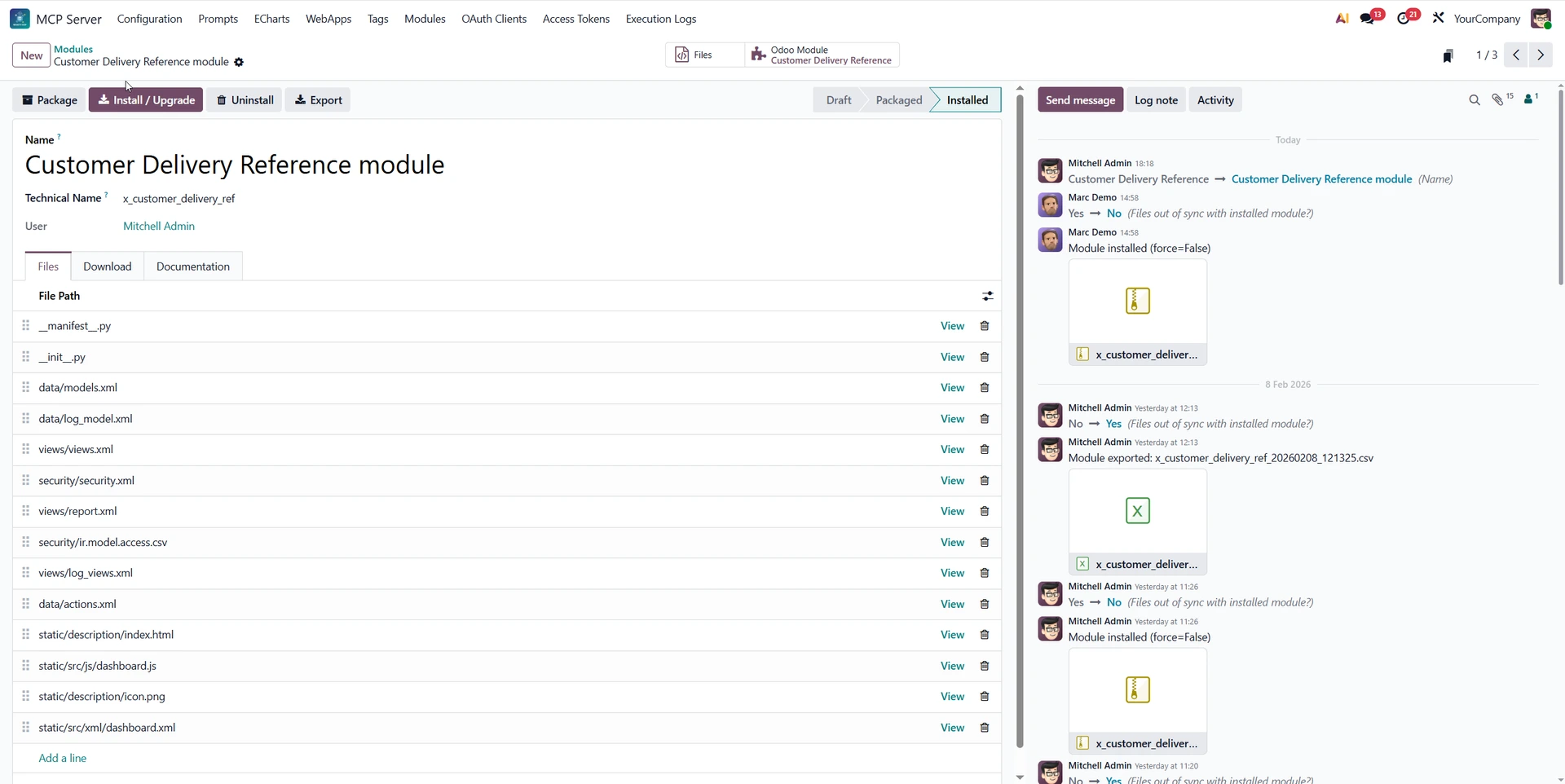
I took the experience from those tools and applied the concepts straight into manage_module.
The goal? Give AI agents the capability to build, iterate, package, and install full Odoo data modules - all through a single tool call.
Models, views, security, server actions, automated actions. The works.
The infrastructure is surprisingly simple:
An mcp.module container record holds a technical name and a list of files. Each file has a path, a text content field for code (XML, CSV, Python manifests), and a binary content field for assets like icons.
The tool handles creating this wrapper, creating the files, validating the manifest, packaging everything into a zip, and triggering module installation, all in one step.
That's the core flow. AI agents can now write new Odoo models, views, security rules, automated actions, and server actions, and have them installed through a single prompt.
The Devil's in the Details
The tool description itself is a beast. It's essentially its own skill file - a long, detailed specification describing every parameter the tool accepts, best practices on how to use it, XML templates for models and fields, load order rules, common gotchas, and code examples.
Why so detailed? Because AI agents need guardrails. I learned this the hard way with execute_orm - no matter how many times you say "NO IMPORTS ALLOWED", sometimes the AI has to fail before it listens. With manage_module, the stakes are higher. Wrong file order in the manifest? Install fails. Wrong field syntax? Install fails. Forgot x_ prefix on your model name? You guessed it.
So I front-loaded all of that knowledge into the tool description. Think of it as a mini Odoo development tutorial that the AI reads every time it uses the tool. Prevention over cure.
Context Efficiency
One thing I picked up from building the webapp tool: AI agents shouldn't have to rewrite entire files for small changes. If you've got a 200-line XML view and you need to add one field, passing the whole file back through is wasteful.
The tool supports code patch operations - surgical find-and-replace edits on existing files. The AI just passes through the sections it needs to change, matching the flow of tools like Claude Code. Small edits stay small. Context windows stay happy.
The Development Flow
Here's where it gets practical. The expected workflow follows a pattern any Odoo dev would recognize: staging → production.
On staging, you develop through conversation. Ask the AI to create a module, iterate on the fields, tweak the views, test it.
The tool handles packaging and installing on every change. When you're happy, hit 'Export' on the module record - it generates a CSV with all your files and metadata, posted straight to the chatter. External IDs included.
On production, go to MCP → Modules, use Odoo's standard Import records to bring in that CSV. Open the newly created module record, click Install / Upgrade. Done. Your AI-built module is live on production.
Need to push an update later? Same flow. Make your changes on staging, export a fresh CSV. On production, delete the old MCP module record (this only removes the file container - the installed Odoo module stays untouched), import new CSV, and hit Install/Upgrade again.
Why delete and reimport instead of updating in place? If you removed files on staging, reimporting over the existing record would leave orphan files behind. Clean slate keeps things tidy.
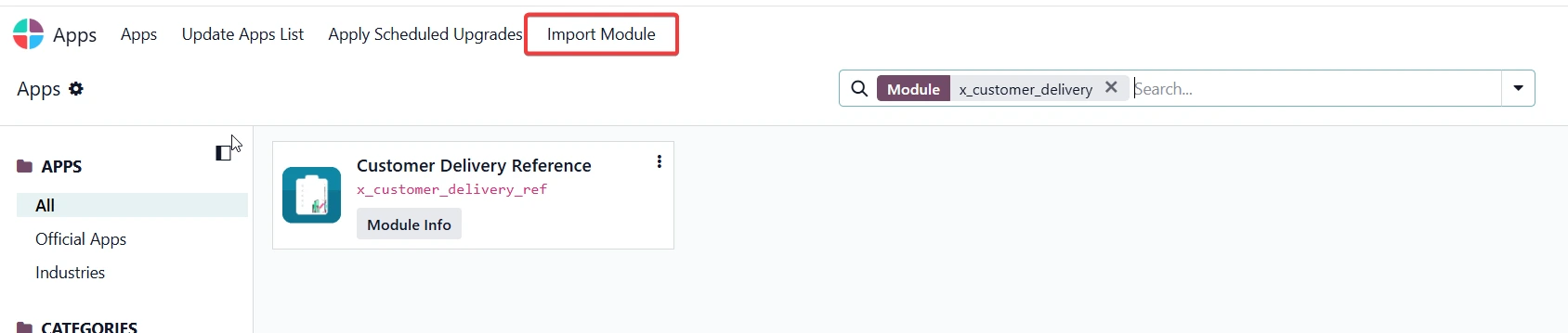
The module ZIP itself is also downloadable from the record. Want to install it on an instance that doesn't even have MCP Studio module installed?
Download the zip, go to Apps → Import Module in vanilla Odoo. It's a standard base_import_module package - zero vendor lock in.
The Limitations (Keeping It Real)
Let's be honest about what this can't do.
Importable modules don't support Python model files. No custom ORM methods, no _inherit on Python models, no compute functions with imports. Your limited to what Odoo's ir.model XML records and safe_eval sandbox can handle.
That means: models with basic fields, computed fields using simple expressions, views, menus, actions, security groups, ACLs, record rules, server actions, and automated actions.
It's not replacing a senior dev writing complex business logic integrated throughout all of odoo. But for basic customizations? For the kind of stuff people use Odoo Studio for? Its more than enough.
And honestly? It tends to write cleaner code than Studio. No auto-generated spaghetti XML IDs and xpaths. No mysterious studio_customization flags littered everywhere that make upgrading odoo versions hell.
Just clean, readable module code.
So... Are Odoo Developers Cooked?
Not yet. But the gap is closing.
A non-technical user can now sit in Claude and say "create me a custom model to track equipment maintenance with a kanban view and automated email reminders" -
and get a working, installed Odoo module back. No terminal. No IDE. No deployment
pipeline.
For simple to mid-range customizations, this is genuinely powerful. For complex business logic that needs Python inheritance and custom methods, you still likely want a developer to steer the ship. For now.
What's in the Module Now
The full toolkit:
- 14 MCP tools - CRUD, code execution, code search/read
- Full OAuth 2.1 with PKCE security
- ECharts dashboard builder - 3D globes, gauges, word clouds, you name it
- React web app builder - full applications, no build step
- Module builder - models, views, security, actions, auto-packaged and installed
- Prompt templates with argument substitution
- Complete audit logging
- Granular access control per user, model, and field
Check It Out
- https://codemarchant.com/mcp/webapp/game-vault - Games and apps built through Odoo MCP Studio tools
- https://apps.odoo.com/apps/modules/19.0/odoo_remote_mcp - get the app
- https://github.com/Codemarchant/odoo_mcp_app_library - library of games/apps ready to import
Let me know your thoughts in the comments. Are Odoo developers cooked? Or is this a recipe for disaster?